Modular Circuits and Hierarchical Gate Design
This guide explains how quantum-emotion organizes complex subcircuits using the ModularGate abstraction, providing reusable modular components and hierarchical circuit visualization.
Tutorial Signposts: - Custom Gates & Rotations: Tutorial 6: Custom Gates (GitHub) - Modular Circuits: Tutorial 9: Modular Circuits (GitHub) - Superdense Coding: Tutorial 10: Superdense Coding (GitHub) - Quantum Phase Estimation: Tutorial 11: Quantum Phase Estimation (GitHub) - Entanglement Swapping: Tutorial 12: Entanglement Swapping (GitHub)
1. Motivation for Modular Design
As quantum algorithms scale to multiple qubits and deep circuits, assembling repetitive primitives from elementary gates becomes difficult to manage: - Circuit code becomes long and prone to wiring errors. - Visual circuit diagrams become cluttered with repeated gate sequences. - Algorithmic structure (such as Fourier transforms or Bell pair distributions) is obscured behind dozens of individual single-qubit gates and CNOTs.
The ModularGate class in quantum_emotion.core solves this by packaging composite subcircuits into named, reusable operations that behave as single gates during simulation and plotting.
2. The ModularGate Architecture
A ModularGate subclasses CompositeGate and adds module metadata:
- is_module = True: Identifies the gate sequence as a modular block during plotting and contraction.
- wires: The sequence of distinct wires on which the module acts.
- nickname: A string (with LaTeX support) displayed on the circuit block when plotted (for example, r"$\mathrm{Bell}$", r"$\mathrm{QFT}$").
- tensor: Returns the contracted rank-\(2L\) tensor of the internal circuit operations, evaluated via cotengra.
from quantum_emotion.core import ModularGate
from quantum_emotion.gates import CNOT, Hadamard

class BellModule(ModularGate):
    r"""Two-qubit Bell state preparation module."""
    nickname = r"$\mathrm{Bell}$"

    def __init__(self, wires: tuple[int, int]) -> None:
        if len(wires) != 2:
            raise ValueError("BellModule requires exactly two wires.")
        super().__init__(
            CNOT(wires=wires),
            Hadamard(wires=wires[0]),
            wires=wires,
        )
3. Built-in Modules
quantum-emotion ships with standard reusable modules:
1. BellModule(wires=(wire_a, wire_b))
Prepares the maximally entangled Bell state \(|\Phi^+\rangle = \frac{|00\rangle + |11\rangle}{\sqrt{2}}\) from ground state inputs using a Hadamard gate on wire_a and a CNOT targeting wire_b.
2. SwapModule(wires=(wire_a, wire_b))
Swaps the quantum states of wire_a and wire_b using three alternating CNOT gates (\(\mathrm{CNOT}_{a,b}\,\mathrm{CNOT}_{b,a}\,\mathrm{CNOT}_{a,b}\)).
3. QFTModule(wires=(w_0, w_1, ...))
Implements the Quantum Fourier Transform on an arbitrary sequence of distinct wires. The module automatically generates: - Hadamard gates on each target wire. - Controlled phase rotations (\(R_k = \text{ControlledPhaseGate}(\theta = \pi / 2^k)\)) from all preceding wires. - A final network of wire swaps (using alternating CNOTs) to reverse bit significance.
4. TeleportationModule(wires=(input, alice, bob), keys=("m0", "m1"))
Encapsulates the complete quantum teleportation protocol:
- Shared Bell pair distribution between Alice and Bob.
- Bell measurement on input and Alice wires.
- Mid-circuit classical measurement recording outcomes under keys.
- Classical feedforward Pauli \(X\) and \(Z\) corrections on Bob's wire.
4. Hierarchical Plotting: Collapsed vs Decomposed
When visualizing circuits with state.plot(), quantum-emotion provides two views:
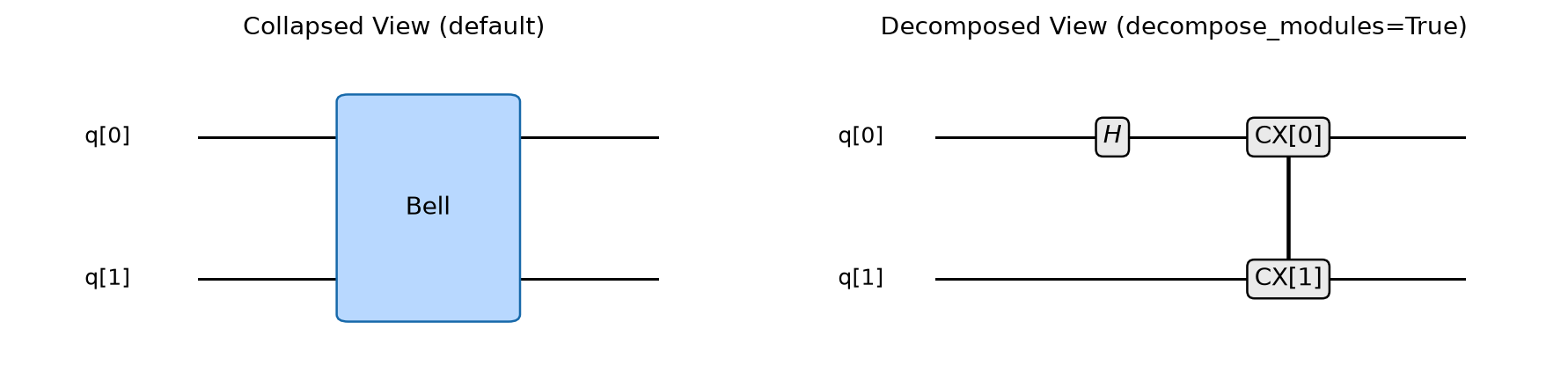
- Collapsed View (Default): Renders the module as a single blue block labeled with its
nickname. This keeps larger circuit diagrams readable. - Decomposed View (
decompose_modules=True): Unpacks the module into its constituent gates and wires.